
Gameplay Setup
World size
We’ve pregenerated each dimension and set square world borders with the following widths:
- Survival overworld: 24k blocks (-12000 to 12000)
- Creative Zone: 10k blocks (-5000 to 5000)
- The Nether: 8k blocks (-4000 to 4000)
- Nether portal creation is disabled outside of 1.5k blocks from the centre, to prevent being able to portal outside of the overworld border. You can build a Vane portal instead.
- The End: 8k blocks (-4000 to 4000)
This should be sufficient for our small player population. You can get a more visual idea of how big these sizes are by checking out the live map
World generation tweaks


We use several datapacks to make the world more interesting, while retaining a vanilla feel - all without requiring any client-side mods!
- The most significant of these is Terralith, which adds a wide variety of new and pretty biomes to the overworld!
- We have disabled its gravel beach biome since its tendency to replace normal sandy beaches will annoy people who need sand to build with, whereas gravel is everywhere and low in demand. Some other Terralith biomes such as steppes will still have gravely riverbanks as normal.
- Nullscape does for The End what Terralith does for the overworld: adds more biomes to make it more interesting. It does however deviate from the vanilla aesthetic a bit, as it makes the outer islands much more vertical (to a max height of 384) and layered, with all kinds of shapes to be seen. The central island where the End Dragon is fought remains pretty much unchanged.

We also have some datapacks that add new kinds of structures to make exploration even more fun:
- Structory, Immersive Structures, its Nether-focused follow-up, and Explorify together add vanilla-feeling things like watchtowers, non-village houses, abandoned buildings, small ships at sea, and more kinds of ruins
- Towns & Towers adds more kinds of themed/biome-specific villages and pillager outposts to the overworld
- We have tweaked these to ensure that the density/frequency of villages and pillager outposts won’t be too high.
- Rebalanced Loot does not add any structures, but it improves the vanilla loot tables used in natural treasure chests, making them more likely to be worth the bother of discovering - including chests in the structures added by other packs! It’ll try to make the theme of the loot more in-keeping with where you found it (e.g. find more minerals in mines), and the buffs are much more significant for rarer structures like woodland mansions.


New items
Again, no client mods required! Just ensure that you accept the server resource pack when prompted on first join, otherwise you won’t see their textures or their names properly (if you reject it by mistake, you can click “Edit” on the server list to change the setting)
-
Sickles - A new tool family that will harvest crops around the one you right click, with gold having the largest radius.
Wood, stone, etc. versions can be made as well, but poorer materials have less range -
Files - A new iron tool that adjusts placed stairs and the connections of fences etc when you right-click them.
-
Slime buckets - Pick up a slime in a bucket! While it’s in your hand, the slime will bounce when you’re inside a slime chunk.
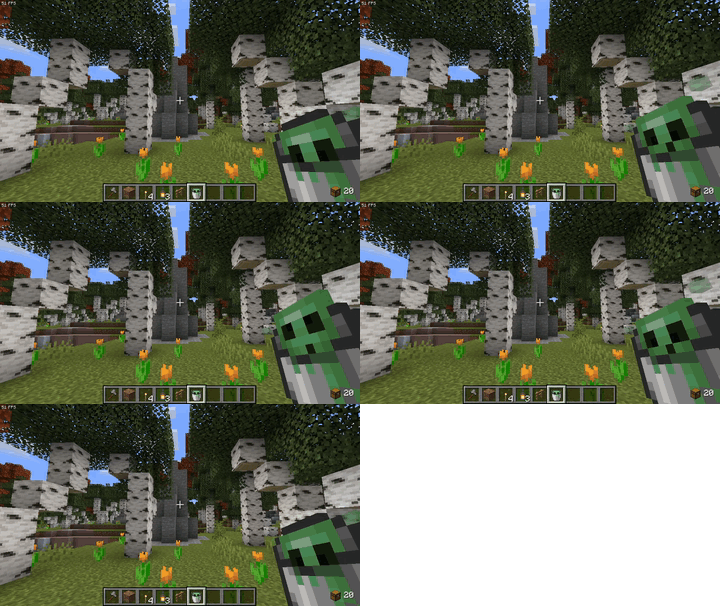
-
Pouches - An early-game 9-slot inventory expansion item. A better version of the bundles that Mojang are currently experimenting with.
-
North compasses - Craft a compass with copper instead of iron and it’ll point North. Handy for people who’d rather use something more vanilla-like than a minimap mod.
-
Backpacks - Smith a smithing template, a shulker box, and a leather chestpiece together to get a backpack. It’s like a shulker box that you can open in your hand, but can’t place as a block.
-
Netherite elytra - Smith a smithing template, elytra, and a netherite ingot together to get some armoured wings!
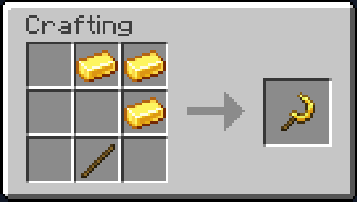
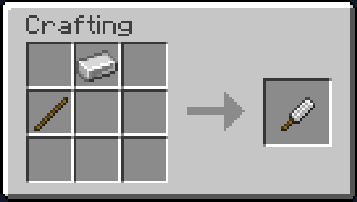
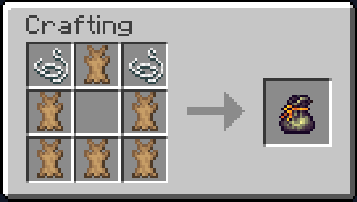
These all come from the Vane plugin suite, by the way.
Additional commands for players
/finditem <item_name>- Can’t remember where you put something? Use this to search containers and entities (e.g. villages) within a 2 chunk radius. If found, you’ll hear a ping and the location will have a puff of smoke. If you already have some of the item that you’re looking for in your inventory, you can shift+right-click it to do the same thing./find-workstation- Use this while next to a villager to get the coordinates of their workstation block, which will also briefly have heart particles around it. Handy for changing a villager’s profession!/portalcoords- Use this from the overworld to get the corresponding Nether coordinates for where you’re standing, and vice versa. Handy for placing portals!
Nicknames and/or pronouns display
Stuck with a username that doesn’t reflect the name that you go by in Usagi’s Twitch chat and Discord because of Reasons™? Do you want people to see what your pronouns are? Let a mod or admin know, and they can set either or both of these for you!

If you have one, your nickname will be visible in the game chat, on your name tag, and in the player list that you can see by holding tab. Your actual Minecraft user name will still be visible as well, for the sake of not causing any number of potential weird breakages. If you have your pronouns set, they can be seen in the player list.

Due to a quirk with how name tag suffixes in Minecraft work, your nickname will also be visible on your named and tamed mobs’ name tags. We figured it’d be cool to be able to see whose pet you’re looking at, but we can work around it with a plugin if people don’t like that.

Portals
We have the vanilla-feeling player-managed portal system from the Vane plugin suite. The aim is to encourage exploring the map, but still make it fairly straightforward to travel between key places like the starting area and our main village, and any other previously-discovered locations that players decide are worth returning to often (e.g. player homes and outposts, or Creative Zone build projects).
How to build and use portals

Vane’s documentation has the full details and some demo GIFs - the only difference is that we don’t use vane-regions (or not yet, at least) therefore the only visibility options are public and private (i.e. just for you to use). In short:
- Construct a portal frame (it doesn’t have to be rectangular, or even vertical!) and place a console block (enchanting table) and lever nearby
- Shift/sneak+right-click the console and then the portal frame to finish construction and name the portal
- Change the portal’s settings via console block - whether it’s publicly usable or not, its style (you can even make it hidden while inactive!), etc.
- Pick a destination portal in the settings, use the lever, and go!
Unlike nether portals, any entity can travel through a Vane portal - including mounts, minecarts (why not try combining a detector rail with how redstone repeaters can also activate a portal?), and projectiles! While this is cool, this also means that Vane portals can’t be used to travel between the Creative Zone and survival worlds - you can only select destinations within the same world group, to prevent resources being sent from creative.
Finding public portals
Once you find a portal that you can use, you’ll be able to view all public portals (and any private ones you own) as destinations. The first portal you’ll run into is most likey the starting village one at (-247, -680), up the road from the survival spawn, or the one right next to the Creative Zone spawn (301, 416).
Alternatively, public portals can be found on the live map. Click the markers button, select Portals, and you’ll see a list of portals that you can also filter. Clicking one will pan the map to its location.

Graves

When you die in a survival dimension, your items and experience will be placed in a grave located where you died instead of dropping to the ground. You’ll have 60 minutes to get back to your grave and retrieve your items (right click to loot it like a chest, or break it and its contents will fall out) before it expires and its contents fall out as normal. Your grave will be protected from being looted or broken by other players for 50 minutes.
There’ll also be a message that reminds you of this, and tells you where the grave is. You’ll also be given a special respawn compass that points towards the grave, and you can right-click with it in your hand it to find out how many blocks away you are from it. If you die again before getting to the grave, then an additional one will be created - you can bring up a menu with all of your graves by running /graves list.
If you die in lava or the void, the grave system will try to place the grave on the last solid block you were on. If you die somewhere that you’re not allowed to build (e.g. in the protected spawn building), then you’ll be told about it and your items will drop as normal.
Other smaller features
PvP Toggle
When you initially join the server, you’ll have PvP disabled. You can turn it on and off for yourself in the survival dimensions with /pvp, with a short cooldown to help prevent abuse. This has no effect in the Creative Zone, where PvP is always off.
Relaxed sleeping/night skipping
Only 40% of online players in the survival overworld need to be in a bed to skip night time. AFK players aren’t counted - e.g. if 6 people are online, 1 is afk, and 2 are in bed, then the night will be skipped (only 2 out of the 5 non-AFK people were needed). Players who weren’t in bed will also count as having slept - i.e. the phantom/insomnia timer will reset for them too.
Dirt path speed boost
Running along dirt paths will give you a small speed boost (the Speed I effect), which will wear off 2 seconds after you leave the path.
Enchantment cost cap
Enchantment costs are capped at a maximum of 39 levels. Your client will still say it’s “too expensive” but you can do it anyway.
Easy double doors
Place two doors of the same type next to each other, and they’ll open and close together as they always should have. No more messing with redstone to make this work!
Natural treasure chest regeneration
Naturally-generated treasure chests in dungeons and other structures will refill with new loot between 12 and 48 hours after a player removes an item from them. A player who has previously looted a given chest may not do so again after it regenerates, so that this won’t be abused.
This makes exploring natural structures more rewarding - you won’t stumble on somewhere cool and be disappointed to find out that someone had already been there! Newer players also won’t have to explore further than older players did as the server ages.
The server will remind you of this if you try to break a natural chest with a loot table, but you’ll be able to do so anyway after several seconds if you’re sure about it.

Crop farming improvements
Right-clicking a mature crop will harvest it straight to your inventory and auto-replant it for you - it’s that simple! It won’t add seeds into your inventory though, so if you need more just left-click as normal. Also, only players can trample farmland - mobs, especially villagers, won’t do it anymore!
Also see sickles, under new items.
Quick tree felling
When you break a tree’s log block with an axe, it’ll also chop down the rest of the tree for you! You can suppress this by sneaking (hold shift by default). The plugin knows not to include player-placed blocks nor anything that doesn’t really look like a tree (e.g. it’ll check for a minimum amount of leaves, so that log pillars as part of buildings are excluded). If something does go wrong anyway, let a mod or admin know and they can roll back the damage for you!
Please note that it may sometimes not work for the new tree shapes added by Terralith in its biomes. If it doesn’t work for a given tree, you’ll have to cut it down the normal way.
Better mending
If you have equipped multiple items with the mending enchantment, the one with the least remaining durability will be repaired first when gaining XP instead of a random item being picked each time like in vanilla.
Villagers

Villagers will follow you if you hold an emerald block in your hand, making them much easier to transport!
Purpur’s villager lobotomisation is enabled - trap a villager in a 1x1 space (e.g. with fences or trap doors) and they will stop ticking except to restock trades. You’ll know if this works if the villager stops even looking at you after being trapped for 10 seconds. Please make use of this if you wish to build a trading hall since it’ll help with server performance.
Break single slab of double-slab blocks
You can break one slab of a double-slab block at a time by doing so while sneaking (hold shift by default)
And some very technical wee things that shouldn’t bother anyone
- You may not write books due to it being a common exploit vector
- You will be teleported back to spawn if you somehow get past the world border or onto the nether’s roof
- Monster spawn attempts happen every 4 ticks instead of every tick. The game will still quickly reach mob spawning limits, so this should not affect the yield of mob farms nor how common monsters are perceived to be. Let us know if you think there’s a problem.
- Grass spread is only attempted every other tick rather than every tick. This should not be noticeable.
- Pufferfish’s DAB is enabled, which gradually reduces the tick frequency of some more expensive mobs (mainly villagers) the further they are from a player. This shouldn’t affect the yield of e.g. iron golem farms, but let us know if there’s a problem.
- Pufferfish’s suffocation optimisation is enabled, which miiiight affect some niche mob farm designs which rely on tick-precise timing to kill mobs. You should be able to not rely on that.
- We’ve enabled the Alternate Current implementation of redstone for performance. The only known behavioural difference from vanilla is that it’s location-independent, so very niche contraptions that rely on location-based behaviour differences won’t work.
- Mob spawners can be deactivated with redstone. Please make use of this to allow any farms you build around spawners to be turned off when not in use.
- Armour stands are configured not to tick, collide with entities, nor be pushed around, in order to prevent common types of lag machine. We’re not aware of any legitimate uses of these features.
- Treasure maps can point to locations that have already been discovered, in order to mitigate the lag from opening one for the first time. You shouldn’t miss out on any loot because of this - see natural treasure chest regeneration.